

EBT Unlock Key – FAQ
Browser-Based Bosch Tuning – Frequently Asked Questions (FAQ)
This FAQ explains the most important differences between browser-based tuning solutions for Bosch Gen1–Gen4 (BES1 & BES2) and Bosch Smart System (BES3).
- 1. Introduction & General
- 2. System Logic & Product Selection
- 3. Compatibility & Technical Requirements
- 4. Application & Functionality
- 5. Licensing & Purchase
- 6. Legal Information
- 7. Display Behavior
- 8. Cables, Browser & USB Connection
- 9. Support & Help
1. Introduction & General
What is browser-based Bosch tuning?
Browser-based Bosch tuning is a digital way to access compatible Bosch e-bike systems through a USB connection and a supported browser.
Instead of installing a chip or opening the motor, tuning is handled digitally through a browser interface.
Which Bosch systems are covered?
Browser-based solutions are available for two main Bosch system families:
Gen1–Gen4 (BES1 & BES2) and
Bosch Smart System (BES3).
These systems require different solution paths and should not be treated as the same platform.
What is the difference between EBT Unlock Key and EBTsmart Unlock Key?
The EBT Unlock Key
is the browser-based solution path for many classic Bosch systems from Gen1 to Gen4 with BES1 or BES2 architecture.
The EBTsmart Unlock Key
is the separate browser-based main solution path for Bosch Smart System (BES3).
How does browser-based tuning differ from conventional tuning chips?
Browser-based tuning does not require classic chip installation or opening the motor.
It is a digital, system-based approach via USB and browser connection rather than classic hardware installation.
What are Unlock Keys in general?
Unlock Keys are digital unlocking solutions. For Bosch systems, the change is made software-based through the browser.
No additional hardware has to be installed inside the motor.
A complete overview is available here:
Everything about the Bosch Unlock Keys.
2. System Logic & Product Selection
What is the most important rule before any recommendation?
The most important step is not the motor name, but the system.
The basic logic is:
BES1 / BES2 → EBT Unlock Key,
BES3 / Smart System → EBTsmart Unlock Key.
What does BES1 / BES2 / BES3 mean in practice?
BES1 and BES2 describe the classic Bosch system world from Gen1 to Gen4.
BES3 describes the Bosch Smart System.
They do not share the same unlock path.
What if the bike uses the eBike Flow App?
The eBike Flow App is a strong Bosch Smart System signal.
If a bike is clearly connected to Flow App logic, the Smart System path should be assumed first.
How should Bosch Smart System be checked correctly?
For Bosch Smart System, the recommended order is:
BDU first, then rim magnet, then ABS / ABS Pro, then eShift.
Only after that should display, battery and remote be treated as secondary details.
What is a BDU and why does it matter?
BDU stands for Bosch Drive Unit.
The BDU identifier is usually more important than battery, display or remote when matching the correct Smart System solution.
Typical Smart System BDU families include BDU31, BDU33, BDU34, BDU37 and BDU38.
How do I find the BDU?
The BDU can often be found in the eBike Flow App.
It may also be printed on a sticker on or under the motor.
Does a rim magnet automatically mean EBTsmart Unlock Key Switch?
No.
A rim magnet is not an exclusion for the regular EBTsmart Unlock Key.
The EBTsmart Unlock Key should still be checked first for Bosch Smart System.
The EBTsmart Unlock Key Switch is only a supplementary special solution for certain compatible rim magnet configurations.
Can software tuning be ruled out just because a rim magnet is present?
No.
A rim magnet is a Smart System special case, but it is not a general exclusion for EBTsmart Unlock Key.
You can compare both Bosch solutions here:
EBT Unlock Key vs EBTsmart Unlock Key Comparison.
3. Compatibility & Technical Requirements
Which Bosch motors are compatible?
Compatibility depends first on system architecture, not only on marketing names.
In general, Bosch Gen1–Gen4 systems belong to BES1 or BES2, while Bosch Smart System belongs to BES3.
The correct solution depends on that distinction.
Does EBT Unlock Key work with Bosch Smart System (BES3)?
No.
Bosch Smart System requires its own browser-based solution path.
For Smart System bikes, the main solution is the
EBTsmart Unlock Key.
Which solution is relevant for Bosch Gen1–Gen4?
For many Bosch Gen1–Gen4 bikes with BES1 or BES2 architecture, the relevant browser-based solution is the
EBT Unlock Key.
Which solution is relevant for Bosch Smart System?
For Bosch Smart System bikes with BES3 architecture, the relevant path is the
EBTsmart Unlock Key.
Rim magnet, ABS and eShift are special cases inside that Smart System logic.
How do I find out whether a Bosch bike is BES2 or BES3?
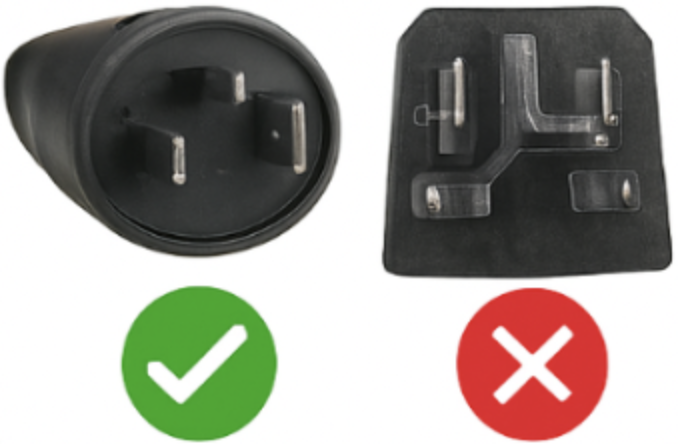
A practical first clue is the charging plug:
a round charging plug usually points to BES2,
while a square charging plug usually points to BES3 / Smart System.
A detailed guide is available here:
Bosch BES2 or Bosch BES3 – Identify Your Bosch E-Bike.
Is Bosch Gen1 always supported?
No.
Bosch Gen1 is a special case.
The classic Gen1 setup that matters for the EBT Unlock Key path is Gen1 with Intuvia.
Gen1 HMI is not part of the standard EBT path.
Which displays are compatible?
Display compatibility depends on the Bosch system and the specific solution used.
For classic Bosch systems, older display generations are relevant.
For Smart System bikes, newer displays and controller combinations belong to the Smart System logic and should be evaluated together with BDU, rim magnet, ABS and eShift.
What do I need to use browser-based tuning?
You typically need a compatible computer or Android device, a supported browser, a stable internet connection and a real USB data cable.
The exact requirements depend on whether the solution uses WebHID or webUSB.
For setup details, see the
EBT Unlock Key Instructions
or the
EBTsmart Unlock Key Instructions.
Are smartphones or tablets supported?
Support depends on the solution path.
In general, Windows computers, Apple computers and Android smartphones are supported.
iPhone and iPad are not supported.
Which operating systems are supported?
Browser-based Bosch tuning is aimed at supported Windows and macOS computers plus supported Android smartphone workflows.
iOS / iPadOS should not be assumed to be compatible.
Does firmware matter?
Yes, especially on Bosch Smart System.
Firmware status should be checked carefully. For current Smart System notes, see:
EBTsmart Unlock Key compatibility with current Bosch Smart System firmware.
4. Application & Functionality
How does unlocking work?
The basic logic is simple:
choose the correct browser-based solution for your Bosch system, connect the bike via USB,
open the browser interface, enter the license information and activate the supported tuning mode.
What is the login area for Bosch Unlock Keys?
Bosch browser-based activation uses the Bosch login area:
ebts.unlocked.bike.
Can I deactivate tuning again?
Yes.
Browser-based solutions are designed around reversibility.
Depending on the supported system logic, you can return to the factory state again.
Is the change permanent?
The unlock can remain active, but the process is also designed to be reversible.
The exact behavior depends on the supported solution and Bosch system architecture.
Can tuning be switched while riding?
No.
Browser-based tuning is not intended as a live on-the-fly riding control.
It is a setup and configuration process through a connected device.
Does browser-based tuning require firmware hacking?
The concept is based on browser-based system access rather than classic hardware installation.
You should always follow the current product-specific instructions and release notes.
Does unlocking create a fixed maximum speed?
No.
Unlocking removes the factory speed limit, but it does not create a guaranteed real-world top speed.
Actual riding speed still depends on rider weight, battery level, wind, slope, temperature, tires and riding mode.
5. Licensing & Purchase
How does the license model work?
License logic is system-based and usually linked to one compatible bike or one supported system setup.
Multi-bike use generally requires the corresponding multi-license or dedicated solution.
Can one license be used on multiple bikes?
No, not as a standard single-bike setup.
If you want to use browser-based tuning on more than one bike, use the matching license model.
Can a digital license be returned?
Digital products may be excluded from withdrawal once execution has started and the required legal conditions have been accepted.
Always check the current purchase terms.
Do I receive the code immediately?
The exact delivery logic depends on the solution.
For digital licenses, access is tied to the corresponding purchase and activation flow.
What if I lose my license key?
Keep your invoice and order data.
For order-related support, your order number is usually the first thing that will be needed.
6. Legal Information
Is tuning legal on public roads?
In many countries, no.
Removing the speed limit can change the legal classification of the bike and may make it illegal for normal public-road use.
Where may a tuned bike be used?
Use is generally limited to places where this is legally permitted, such as private property or closed areas.
Public-road use may require registration, insurance and additional legal requirements.
Can there be legal consequences?
Yes.
Depending on the jurisdiction, consequences may include fines, insurance issues, liability risks or further legal problems.
Does tuning affect warranty or manufacturer liability?
It may.
Modifications or digital changes can affect warranty, goodwill and manufacturer liability.
Can tuning be detected?
Detection cannot be ruled out.
Service checks, diagnostics or related system inspections may reveal changes depending on the system and use case.
7. Display Behavior
Will the display always show correct speed after tuning?
No, not necessarily.
Display behavior depends on the Bosch generation, display type and the specific browser-based solution used.
What happens on classic Gen2–Gen4 systems?
On many classic Bosch systems, shown speed or distance values may be shared or halved compared with actual riding values after activation.
What happens on Gen1 systems?
Supported Gen1 Intuvia setups can retain correct display values.
Gen1 HMI is not part of the standard EBT path.
What about Smart System display behavior?
Smart System behavior depends on the selected unlock mode.
In the Smart System logic, the normal 32 km/h level is associated with correct values, while optional higher unlock modes can change the displayed values.
Can display behavior be freely adjusted?
Not as a general rule.
Display behavior follows the technical logic of the supported system and solution.
8. Cables, Browser & USB Connection
Which cable do I need?
The required cable depends on your Bosch display and system setup.
What matters most is that it is a real USB data cable, not a charge-only cable.
Can I use a regular USB cable?
Only if it supports data transfer.
Many charging cables are not suitable.
Which browser interface does the unlock use?
EBT Unlock Key requires WebHID.
EBTsmart Unlock Key and EBTsmart Unlock Key Switch require webUSB.
Can I use hubs, adapters or extension chains?
A direct USB connection is generally recommended.
Extra adapters or hubs can cause recognition problems.
Where can I find compatible cables or accessories?
For current compatible accessories and supported workflows, use the
official instructions
and product pages.
9. Support & Help
What if my bike is not recognized?
First check the cable, browser, direct USB connection and internet connection.
Also make sure you selected the correct Bosch solution path for your system.
What if I do not know whether my bike is BES2 or BES3?
Start with the charging plug and the system signals.
If it is clearly a Smart System bike, stay within Smart System logic:
first EBTsmart Unlock Key, then BDU, rim magnet, ABS and eShift.
What are strong Smart System signals?
Strong signals include:
Flow App, BES3, Bosch Smart System, newer charging-port logic, modern BDU families, LED Remote and similar modern Bosch indicators.
What if a customer mentions rim magnet on Bosch Smart System?
Then the correct first software solution is still EBTsmart Unlock Key.
The Switch should only be checked as an additional special case where appropriate.
What if I lost my license key or need order help?
For order-related support, use the support or shop contact path and keep your order number ready.
